

Format a Spreadsheet Header Row on Windows

A clear header tells readers what each column contains. Keep the labels short, use a consistent style, and leave enough contrast between the text and its fill.
For matching example data, use the Practice workbook section at the end of this guide.
Style the header
Open a fresh working expense workbook.
On Expenses, select A1:E1.
On Home, keep Bold enabled for the header. If your starting header is plain, choose Bold to turn it on.
Open Fill color and choose a dark green swatch. Open Font color and choose white for contrast.
Check that Item, Amount, Category, Owner, and Status remain fully readable.
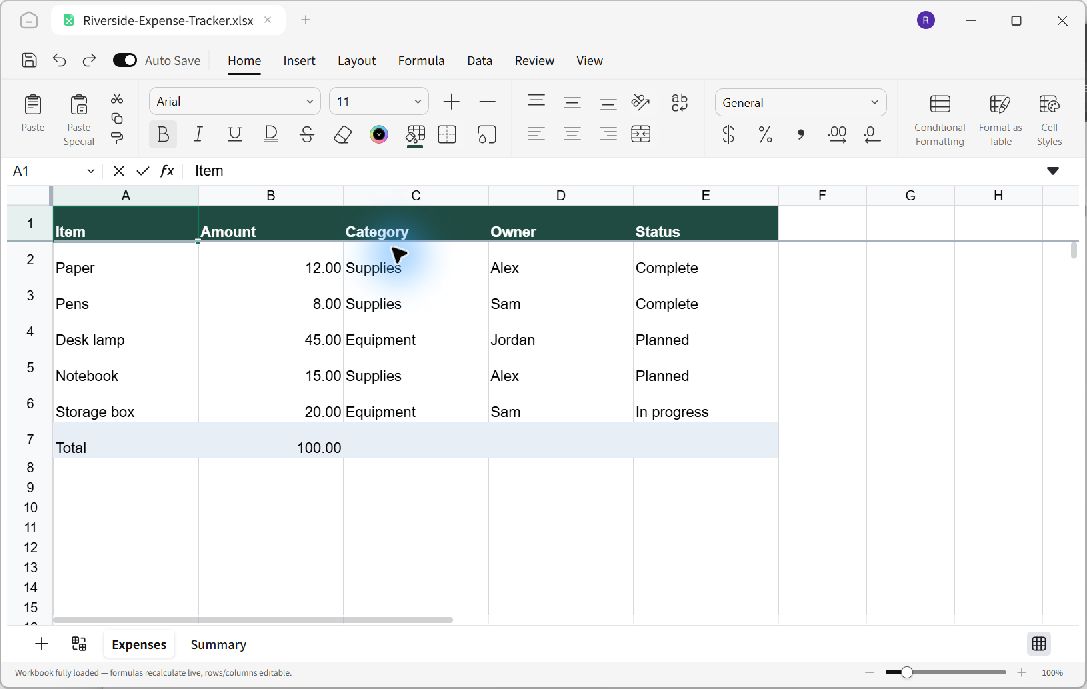
A single header style groups the column labels without obscuring their text.
Review the whole table
Check the data rows below the header as well. The formatting should identify the labels while keeping the amounts and status values easy to read. Widen a column when a label is clipped.
A colored header is a visual treatment. It does not by itself create a filter or change which rows belong to a data range.
Save the appearance
Press Ctrl+S and reopen the workbook. Confirm that the header style remains consistent across all five columns and that the expense values are unchanged.
Practice workbook
To reproduce this example, start with a separate practice copy. On Ulet Home, choose Sheets. Rename the first worksheet Expenses and enter the following values in A1:E6. Enter amounts as numbers.
Item | Amount | Category | Owner | Status |
|---|---|---|---|---|
Paper | 12 | Supplies | Alex | Complete |
Pens | 8 | Supplies | Sam | Complete |
Desk lamp | 45 | Equipment | Jordan | Planned |
Notebook | 15 | Supplies | Alex | Planned |
Storage box | 20 | Equipment | Sam | In progress |
Enter Total in A7 and =SUM(B2:B6) in B7. The initial total is 100. Column widths, colors, and number formatting are presentation choices; the values and cell addresses are what the exercise depends on.
Press Ctrl+Shift+S to choose a practice folder and save as Riverside-Expense-Tracker.xlsx. Reopen this named copy before following the exercise above. Keep your original documents separate.
