

Build a Simple Expense Tracker on Windows

Build a small supply tracker with two input rows and a calculated total. The fictional sample uses US dollars and keeps each line calculation beside its inputs.
Enter the inputs
On Home, choose Sheets to create a workbook.
Use A1:D1 for Item, Quantity, Unit price (USD), and Cost (USD).
On row 2, enter Paper, quantity 2, and unit price 12.
On row 3, enter Pens, quantity 3, and unit price 8.
Calculate the costs
Enter =B2*C2 in D2.
Enter =B3*C3 in D3.
Enter Total in A4 and =SUM(D2:D3) in D4.
Check the two line costs, 24 and 24, and the total, 48.
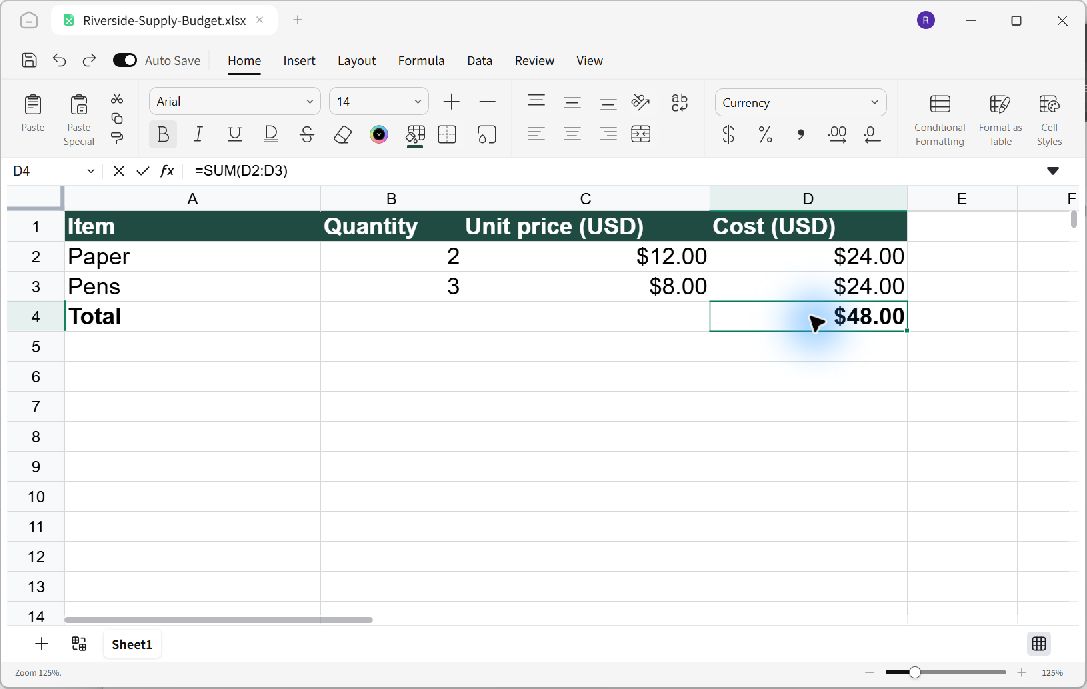
Each line cost uses its row's quantity and price; the total adds the completed line costs.
Make it readable and save
Select A1:D4 and choose a readable font size. Widen the columns so every heading fits. On Home, give A1:D1 bold white text with a dark green fill, and choose Currency for C2:D4. Make the Total row bold. Press Ctrl+Shift+S and save as Riverside-Supply-Budget.xlsx.
Reopen the saved workbook and inspect D2 and D4 in the formula bar. Confirm the formulas remain available for future input changes.
